
Premium Report - Duplicate SKUs
Duplicate SKUs
This report does exactly what you would expect - show any variants which have duplicated SKUs.
This is often useful for merchants who are tidying up their product catalogue and need to make sure that no two SKUs are the same across different product variants.
You can then use this list to navigate to Shopify and modiy your Product Variants accordingly.
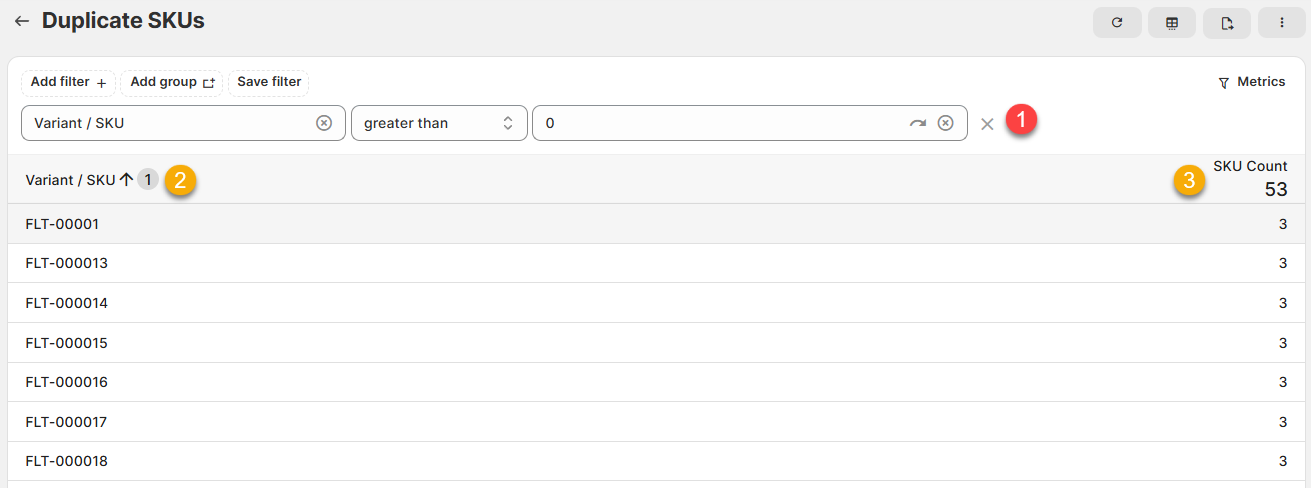
From this report, you can see which SKUs appear more than once and the number of times they appear.
As a Premium Reports, this is available on all Paid Plans of Report Toaster. If you aren't signed up, follow these steps here to upgrade your account.
(click image to enlarge)
Here is what you need to be familiar with to understand the Duplicate SKUs report:
1.) Variant/SKU, greater than, 0 (FILTER):
This filter ensures that only product variants that have a SKU are included in the report
2.) Variant / SKU:
The list of SKUs that appear on more than one product variant.
For example, looking at the above, we can see that FLT-00001 appears on more than 1 product variant
3.) SKU Count:
The number of times that SKU appears on product variants.
For example, if FLT-00001 is marked as 3, that means it appears on 3 different Product Variants.
Like all Report Toaster reports, these reports are fully customizable - so you can adjust the date range, add/remove columns, introduce a filter or change the sort to suit your individual needs. See our basic guides here for more info.
For other premium reports you can add to your account, check out our other article guides here.